How to Calculate Loan EMI: Mathematical Formula & Worked Example
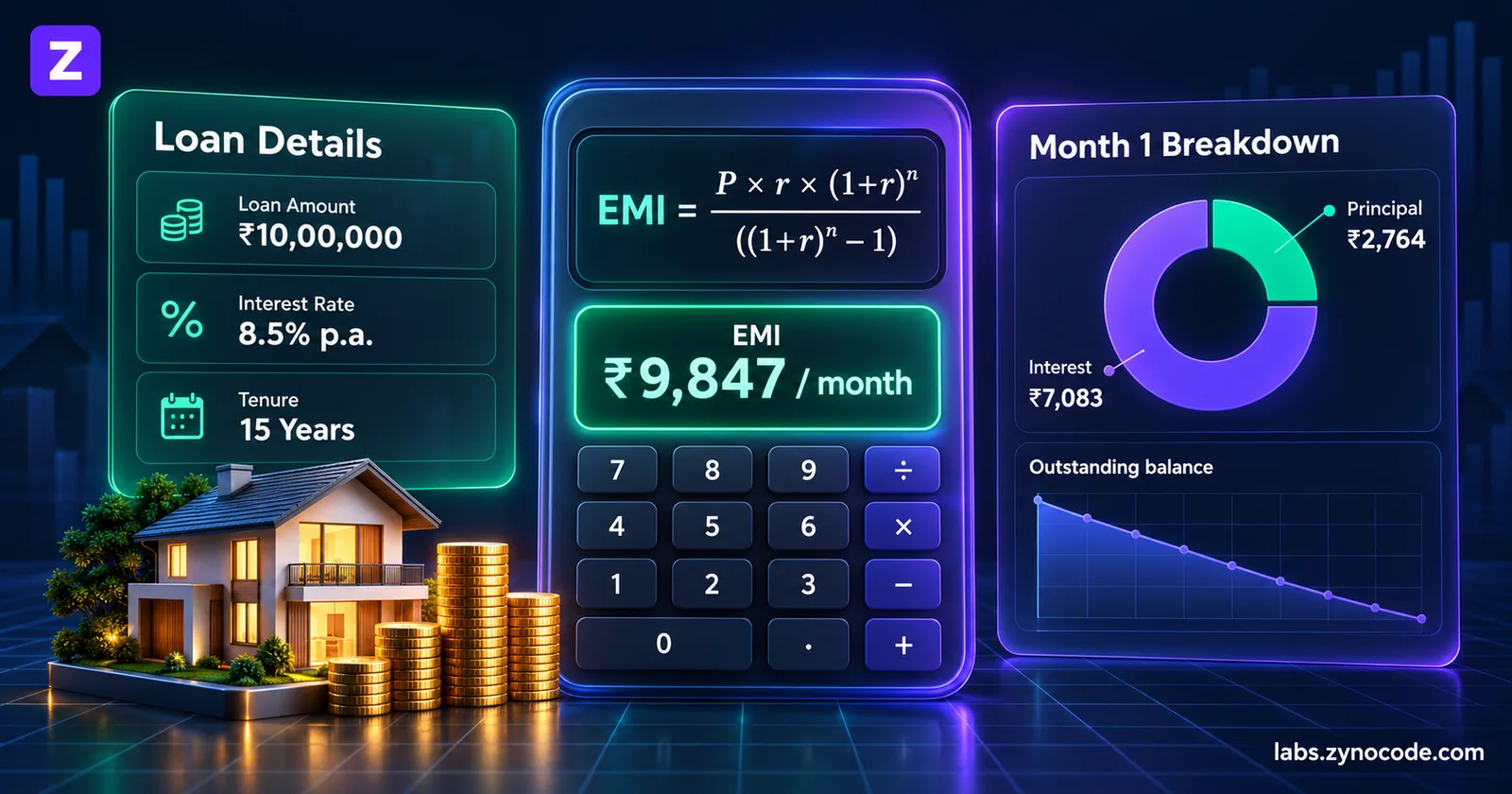
Loan EMI is calculated using the reducing-balance formula: EMI = [P x R x (1+R)^N] / [(1+R)^N - 1], where P is Principal, R is monthly interest rate (Annual Rate / 1200), and N is tenure in months. For ₹10 Lakhs at 8.5% for 15 years, the monthly EMI is ₹9,847.
An Equated Monthly Installment (EMI) is the fixed monthly amount a borrower pays to a financial institution to repay an outstanding loan over a specified tenure. Each EMI payment is divided into two distinct parts: interest on the outstanding loan balance, and principal repayment that reduces the total debt.
Whether you are planning a home loan, car loan, education loan, or personal loan, calculating your EMI before signing a loan agreement is essential. It enables you to determine affordability, compare loan offers, and forecast total interest costs across different tenures. You can model scenarios instantly using our interactive /tools/emi-calculator.
The Mathematical EMI Formula
Commercial banks and non-banking financial companies (NBFCs) in India use the reducing-balance method to calculate loan installments. Under this method, interest is calculated each month only on the remaining unpaid principal rather than the original borrowing amount.
The standard reducing-balance EMI formula is:
EMI = [P × R × (1 + R)^N] / [(1 + R)^N - 1]Where:
- P (Principal): The total capital amount borrowed from the bank.
- R (Monthly Interest Rate): The annual interest rate divided by 12 months and expressed as a decimal. Formula:
R = Annual Rate / (12 × 100). For an 8.5% annual rate,R = 8.5 / 1200 = 0.00708333. - N (Tenure in Months): The total repayment period in months. Formula:
N = Tenure in Years × 12. For a 15-year loan,N = 15 × 12 = 180 months.
Step-by-Step Worked Example
To understand how the formula works in practice, let us compute the exact figures for a realistic Indian home or personal loan:
- Principal (P): ₹10,00,000 (₹10 Lakhs)
- Annual Interest Rate: 8.5% per annum
- Loan Tenure: 15 years (180 months)
1. Calculate the Monthly Interest Rate (R)
R = 8.5 / (12 × 100) = 0.00708333332. Calculate the Compounding Factor (1 + R)^N
(1 + R)^N = (1 + 0.0070833333)^180 ≈ 3.551717553. Compute the Numerator and Denominator
Numerator = P × R × (1 + R)^N
Numerator = 10,00,000 × 0.0070833333 × 3.55171755 = 25,158.00

Denominator = (1 + R)^N - 1
Denominator = 3.55171755 - 1 = 2.55171755
4. Divide to Find the Monthly EMI
EMI = 25,158.00 / 2.55171755 = ₹9,847.40 (rounded to ₹9,847)5. Compute Total Loan Costs
- Total Amount Payable:
₹9,847 × 180 = ₹17,72,460 - Total Interest Payable:
₹17,72,460 - ₹10,00,000 = ₹7,72,460
Over 15 years, the interest paid represents 43.6% of the total payout.
Month-by-Month Amortization Breakdown
Although the EMI remains identical every month, the internal split between principal and interest shifts continuously. In the initial years, the bulk of your payment covers interest charges. As the principal drops, monthly interest decreases and principal repayment accelerates.
Here is the month-by-month breakdown for the first three installments of our ₹10 Lakh loan. You can generate a full breakdown with our Home Loan Amortization Schedule:
| Month | Opening Principal | Monthly EMI | Interest Component | Principal Component | Closing Principal |
|---|---|---|---|---|---|
| Month 1 | ₹10,00,000 | ₹9,847 | ₹7,083 | ₹2,764 | ₹9,97,236 |
| Month 2 | ₹9,97,236 | ₹9,847 | ₹7,064 | ₹2,783 | ₹9,94,453 |
| Month 3 | ₹9,94,453 | ₹9,847 | ₹7,044 | ₹2,803 | ₹9,91,650 |
- Month 1 Interest:
₹10,00,000 × (8.5 / 1200) = ₹7,083.33(rounded to ₹7,083). - Month 1 Principal:
₹9,847 - ₹7,083 = ₹2,764. - Month 2 Interest:
₹9,97,236 × (8.5 / 1200) = ₹7,063.75(rounded to ₹7,064). - Month 2 Principal:
₹9,847 - ₹7,064 = ₹2,783. - Month 3 Interest:
₹9,94,453 × (8.5 / 1200) = ₹7,044.04(rounded to ₹7,044). - Month 3 Principal:
₹9,847 - ₹7,044 = ₹2,803.
To inspect the full repayment table across all 180 months, explore our dedicated /tools/loan-amortization-schedule.
The Impact of Loan Tenure on Total Interest
Choosing the right loan tenure requires balancing monthly cash flow with cumulative lifetime interest. While a longer tenure reduces your monthly EMI, it sharply increases total interest costs.
Here is how tenure alters the repayment profile for a ₹10 Lakh loan at 8.5% interest:
| Loan Tenure | Monthly EMI | Total Interest Payable | Total Loan Payout |
|---|---|---|---|
| 10 Years (120 mo) | ₹12,399 | ₹4,87,880 | ₹14,87,880 |
| 15 Years (180 mo) | ₹9,847 | ₹7,72,460 | ₹17,72,460 |
| 20 Years (240 mo) | ₹8,678 | ₹10,82,720 | ₹20,82,720 |
Extending tenure from 10 years to 20 years saves ₹3,721 each month in cash outflow. However, it incurs an additional ₹5,94,840 in total interest charges—more than doubling the cost of borrowing.
The Impact of Interest Rate Fluctuations
For floating-rate loans, small changes in the annual percentage rate alter both your monthly commitment and long-term interest:
| Annual Interest Rate | Monthly EMI (15 Yrs) | Total Interest Payable |
|---|---|---|
| 7.5% per annum | ₹9,270 | ₹6,68,600 |
| 8.5% per annum | ₹9,847 | ₹7,72,460 |
| 9.5% per annum | ₹10,442 | ₹8,79,560 |
A 1.0% change in the borrowing rate on a ₹10 Lakh loan changes the monthly payment by approximately ₹577–₹595 and increases total interest by more than ₹1,03,000.
How Loan Prepayments Save Money
Prepayment refers to paying extra capital toward your loan ahead of schedule. A prepayment reduces your outstanding principal, so every later month's interest is calculated on a smaller balance. For a full comparison of reducing your monthly installment versus shortening your repayment period, read our guide on Home Loan Prepayment: Reduce EMI or Tenure?. (Check your loan agreement first: some lenders charge a prepayment fee on fixed-rate loans.)
For the same ₹10 lakh loan at 8.5% for 15 years (EMI ₹9,847), keeping the EMI unchanged:
- Regular Monthly Prepayment: Adding an extra ₹1,000 to your monthly payment (paying ₹10,847 instead of ₹9,847) clears the loan about 30 months early and saves approximately ₹1.46 lakh in interest.
- Lump Sum Prepayment: Making a one-time principal prepayment of ₹1,00,000 at the end of Year 3 clears the loan about 25 months early and saves approximately ₹1.53 lakh in interest.
How to Calculate EMI in Excel and Google Sheets
If you want to calculate loan payments in a spreadsheet, Microsoft Excel and Google Sheets provide the built-in PMT function.
The syntax is:
=PMT(rate, nper, pv, [fv], [type])- rate: The interest rate per period (
Annual Rate / 12). - nper: The total number of payment periods (
Tenure Years * 12). - pv: The present value or principal amount (entered as a negative number so the formula returns a positive cash outflow).
Excel Formula for Our Worked Example
=PMT(8.5%/12, 15*12, -1000000)Entering this formula into any cell immediately displays ₹9,847.40.
You can also use =PPMT() to calculate the principal portion of any specific installment and =IPMT() to calculate the interest portion for that month.
To evaluate custom loan amounts, interest rates, and multi-year repayment plans without spreadsheet setup, use our free /tools/emi-calculator and generate full repayment schedules in seconds.
Popular Loan EMI Calculations
Explore pre-computed amortization and EMI schedules for common borrowing amounts:
- ₹10 Lakh Home Loan EMI — Monthly EMI of ₹8,678 for 20 years at 8.5% example rate, with 10–25 year comparison.
- ₹20 Lakh Home Loan EMI — Monthly EMI of ₹17,356 for 20 years at 8.5% example rate, including total interest of ₹21,65,552.
- ₹30 Lakh Home Loan EMI — Monthly EMI of ₹26,035 for 20 years at 8.5% example rate, with tenure comparisons.
- ₹50 Lakh Home Loan EMI — High-value home loan EMI of ₹43,391 for 20 years at 8.5% example rate.
- ₹5 Lakh Car Loan EMI — Auto loan installment of ₹10,379 for 5 years at 9.0% example rate.
- ₹2 Lakh Personal Loan EMI — Unsecured loan installment of ₹6,643 for 3 years at 12.0% example rate.
Frequently asked questions
What is the mathematical formula to calculate loan EMI?+
The reducing-balance EMI formula is EMI = [P x R x (1+R)^N] / [(1+R)^N - 1], where P is Principal amount, R is monthly interest rate (Annual Rate / 1200), and N is loan tenure in months.
How do I calculate EMI in Microsoft Excel or Google Sheets?+
In Excel or Google Sheets, use the formula =PMT(rate/12, tenure_years12, -principal). For example, for an 8.5% interest rate, 15-year loan of ₹10,00,000, enter =PMT(8.5%/12, 1512, -1000000), which returns 9847.40.
How does loan tenure affect total interest paid?+
Longer tenures reduce your monthly installment but significantly increase total interest. For example, extending a ₹10 Lakh loan at 8.5% from 10 years to 20 years lowers the EMI from ₹12,399 to ₹8,678, but increases total interest paid from ₹4,87,880 to ₹10,82,720—costing an extra ₹5,94,840.
How do prepayments help reduce loan burden?+
Every rupee prepaid goes directly toward reducing the outstanding principal balance. Because subsequent monthly interest is computed on the reduced principal, prepayments accelerate loan payoff and save lakhs in compound interest. Compare the math in our guide on Home Loan Prepayment: Reduce EMI or Tenure?.

Prashant Sharma · Founder & Technology Strategist
Prashant Sharma is the founder of Zynocode IT Solutions, specializing in web development, SEO tooling and generative AI workflows.