Bcrypt Password Hashing Explained: Cost Factors, Salts & Architecture
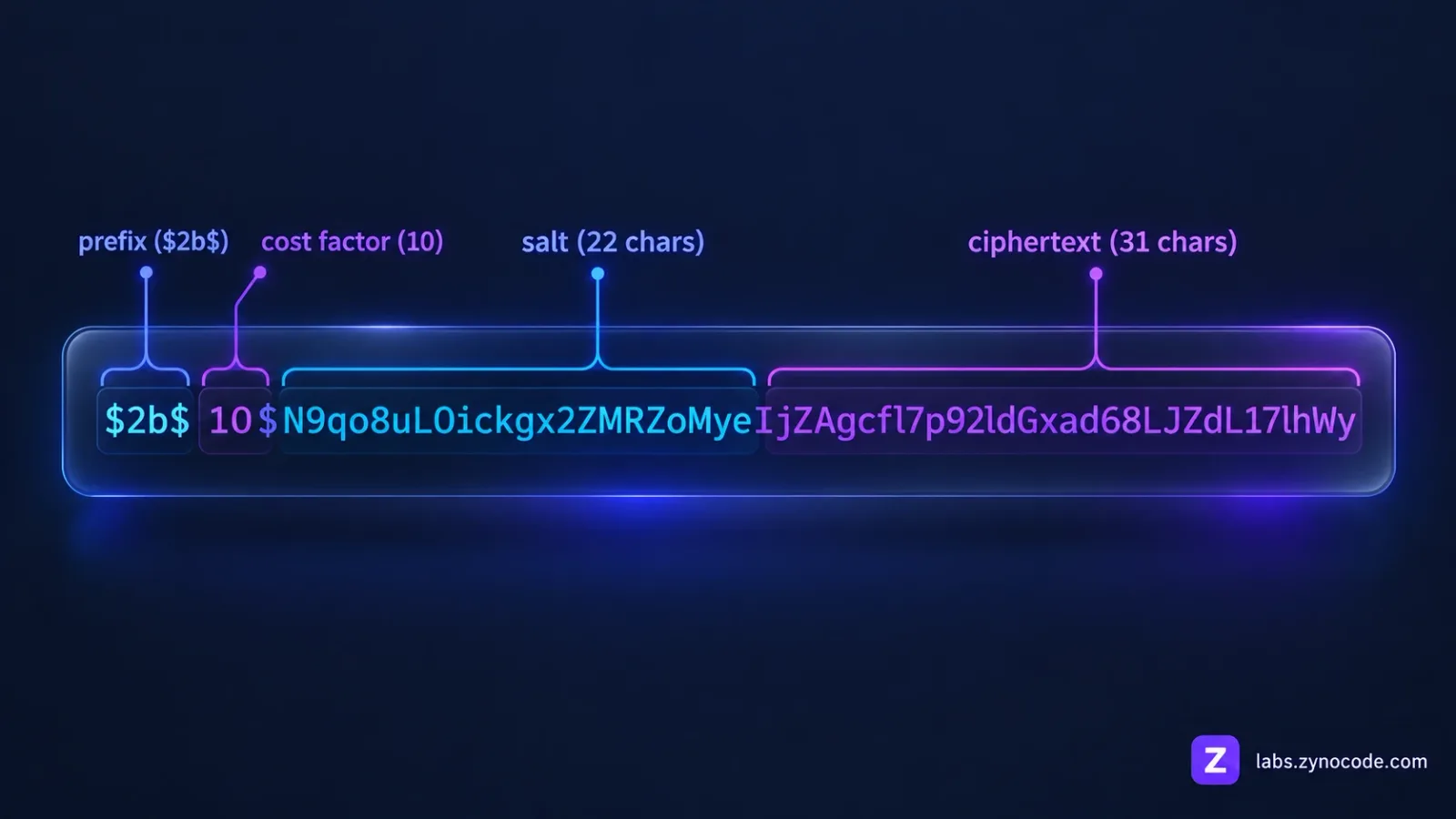
Bcrypt is an adaptive password-hashing function designed to protect credentials against brute-force attacks. Built on the Blowfish cipher, it combines a cryptographically random 16-byte salt with a configurable cost parameter defining 2^cost computation rounds, producing a compact 60-character string that includes algorithm metadata, salt, and ciphertext.
Understanding how bcrypt works is essential for building secure authentication systems. Storing passwords as plain text or fast general-purpose digests like SHA-256 leaves credentials vulnerable to offline cracking. Bcrypt was engineered specifically to make brute-force attacks computationally expensive. Developers can experiment with work factors and credential matching using our browser-based Bcrypt Generator & Checker.
What Is Bcrypt and Why Was It Created?
Bcrypt is an adaptive cryptographic password-hashing function designed to defend credentials against offline attacks. First presented at USENIX in 1999 by Niels Provos and David Mazières in A Future-Adaptable Password Scheme, bcrypt addressed a core flaw in legacy Unix authentication.
Standard Unix systems relied on DES-based crypt(), which had a fixed iteration count of 25. As CPUs accelerated, attackers could test thousands of candidate passwords per second. Provos and Mazières argued that secure password storage requires an adjustable work factor that administrators can scale upward over time.
Bcrypt adapts the Blowfish symmetric block cipher into Eksblowfish (Expensive Key Schedule Blowfish). While standard Blowfish initializes keys quickly, Eksblowfish runs a computationally demanding key schedule that forces attackers to expend significant CPU cycles per guess.
Standard Bcrypt Hash Structure (60 Characters Total):
$2b$10$N9qo8uLOickgx2ZMRZoMyeIjZAgcfl7p92ldGxad68LJZdL17lhWy
\__/ \/ \____________________/\_____________________________/
 |    |            |                         |
Prefix Cost       Salt                   Ciphertext
(3ch) (2ch)     (22 chars)               (31 chars)
Anatomy of a 60-Character Bcrypt Hash
Every standard bcrypt hash output occupies exactly 60 ASCII characters. Rather than storing the salt and algorithm settings in separate database columns, bcrypt embeds all necessary verification parameters directly into a modular string format separated by dollar signs ($):
1. Algorithm Identifier Prefix (Characters 1–4)
The initial characters denote the implementation revision:
$2$was the original OpenBSD implementation specification.$2a$was introduced to clarify null-termination handling and UTF-8 string encoding.$2x$and$2y$were introduced in Solar Designer'scrypt_blowfishlibrary (Openwall), which was used in PHP. An implementation bug incrypt_blowfishcaused signed 8-bit characters to be incorrectly sign-extended during key expansion.$2x$was used for backwards compatibility with the buggy behavior, while$2y$was assigned to denote the corrected implementation.$2b$was released by OpenBSD in 2014 to resolve a minor wraparound bug in their implementation. Today,$2b$is the universal industry standard supported by Node.js (bcrypt/bcryptjs), Python (bcrypt), and modern Unix systems (note that Go'sgolang.org/x/crypto/bcryptcontinues to output$2a$).
2. Cost Factor (Characters 5–6)
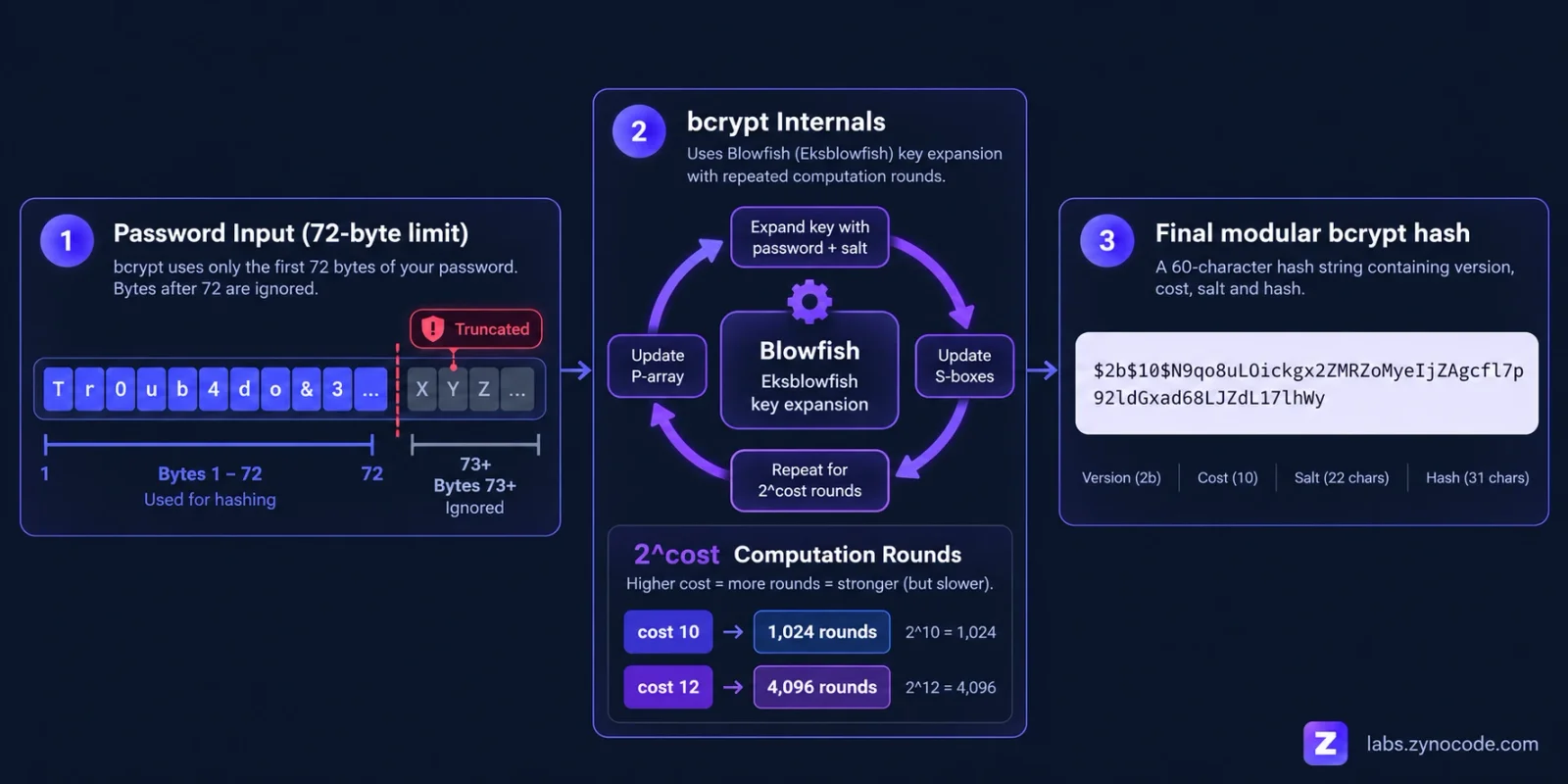
A two-digit integer ranging from 04 to 31 representing the logarithmic work factor. This parameter dictates that the algorithm will execute 2^cost iterations during key setup. For instance, a cost factor of 10 executes 2^10 = 1,024 rounds, while a cost factor of 12 executes 2^12 = 4,096 rounds.
3. Salt String (Characters 8–29: 22 Characters)
A 16-byte (128-bit) cryptographically random salt encoded using a custom Base64 dialect. This salt ensures that two users with identical passwords produce completely distinct hashes, neutralizing precomputed rainbow table attacks.
4. Checksum / Ciphertext (Characters 30–60: 31 Characters)
The final 31 characters encode the first 23 bytes (184 bits) of the 24-byte (192-bit) output produced by encrypting the 24-character plaintext string "OrpheanBeholderScryDoubt" exactly 64 times using Blowfish in ECB mode with the derived key. The 24th byte is dropped, and the remaining 23 bytes are encoded into 31 Base64 characters.
Choosing the Right Cost Factor in 2026
The core defense of bcrypt is computational cost. Fast hashing algorithms like MD5 or SHA-256 process millions of operations per second, which suits file integrity but endangers passwords. Password hashing functions must consume measurable server processing time.
The cost factor scales exponentially:
- Cost 10: 2^10 = 1,024 rounds.
- Cost 11: 2^11 = 2,048 rounds (doubles computation time).
- Cost 12: 2^12 = 4,096 rounds (quadruples cost 10 time).
- Cost 13: 2^13 = 8,192 rounds.
- Cost 14: 2^14 = 16,384 rounds.
Server Benchmark Considerations
According to the official OWASP Password Storage Cheat Sheet, "the work factor should be as large as verification server performance will allow, with a minimum of 10." OWASP further advises that "as a general rule, calculating a hash should take less than one second." The right work factor depends on your own server hardware and traffic, so benchmark it there.
To illustrate how work factors scale, here are benchmark timings measured locally using pure JavaScript bcryptjs on Node.js v24.17.0 (Intel Core i3-1005G1 CPU @ 1.20GHz, averaged over 5 runs per cost factor; native C implementations run significantly faster):
| Cost Factor | Total Iterations | Measured Time (bcryptjs, Node v24.17.0) | OWASP Guidance Alignment |
|---|---|---|---|
| 10 | 1,024 rounds | ~90 ms | Meets OWASP minimum work factor (10) |
| 11 | 2,048 rounds | ~189 ms | Well under 1-second threshold |
| 12 | 4,096 rounds | ~391 ms | Well under 1-second threshold |
| 13 | 8,192 rounds | ~774 ms | Approaching 1-second verification ceiling |
| 14 | 16,384 rounds | ~1,581 ms | Exceeds OWASP recommendation of < 1 second |
The Critical 72-Byte Password Limit
A central constraint of bcrypt is its 72-byte input ceiling.
This limit stems directly from Blowfish's internal state. During key setup, Blowfish initializes an 18-element subkey array of 32-bit words called the P-array (P[0] through P[17]), totaling 18 × 4 = 72 bytes. In Eksblowfish, password bytes are cyclically XORed into this 72-byte P-array. The key schedule consumes exactly 72 bytes of key material before generating S-boxes. Any bytes beyond byte 72 are silently truncated:
PasswordExampleStringRepeatedUntilItExceedsSeventyTwoBytesLongCompletely11111PasswordExampleStringRepeatedUntilItExceedsSeventyTwoBytesLongCompletely22222
If these two passwords are identical across their initial 72 bytes, bcrypt will produce identical hashes for both, even though the tail ends differ. Furthermore, because multi-byte UTF-8 characters (such as emojis or accented characters) consume 2 to 4 bytes each, a password with non-ASCII characters may reach the 72-byte threshold in fewer than 30 written characters.
Password Length Enforcement vs. Pre-Hashing
The simplest and most direct solution recommended by the OWASP Password Storage Cheat Sheet is to enforce a maximum password length: "bcrypt has a maximum length input length of 72 bytes for most implementations, so you should enforce a maximum password length of 72 bytes (or less if the bcrypt implementation in use has smaller limits)."
Why Simple SHA-256 Pre-Hashing Is Dangerous
Some developers attempt to bypass 72 bytes by hashing passwords with raw SHA-256 or SHA-512 before bcrypt. OWASP explicitly warns this is dangerous for two reasons:
- Null-byte truncation: The original bcrypt implementation expects a null-terminated string. If raw binary digests contain null bytes (
0x00), bcrypt truncates input at the first null byte, reducing entropy and increasing collision risk. - Password shucking: If raw digests enter bcrypt, attackers who leak the database can perform "password shucking." Testing
bcrypt(base64(H($password)), $salt, $cost) == bcrypt(base64($leaked_hash), $salt, $cost)only requires comparing precomputed hashes, degrading bcrypt's defense to that of the un-peppered fast hash.
The OWASP-Approved Pre-Hashing Pattern
If your system must support arbitrary-length passphrases with bcrypt, OWASP states that you must use an HMAC with a secret pepper and Base64 encoding:
bcrypt(base64(hmac-sha384(password, pepper)), salt, cost)In this architecture:
$pepperis a high-entropy secret key stored outside the database (such as in an environment variable or external secrets manager).hmac-sha384produces a 48-byte digest and protects against password shucking.base64encodes the digest into a 64-character ASCII string, preventing null-byte truncation while fitting completely within bcrypt's 72-byte limit (unlike SHA-512, whose 88-character Base64 output exceeds 72 bytes and causes truncation).
Plaintext Password (arbitrary length) + Pepper (stored outside DB)
       │
       ▼
[ HMAC-SHA-384 ]  ──►  48-byte binary digest
       │
       ▼
[ Base64 Encoding ]  ──►  64-character ASCII string (fits < 72 bytes, no null bytes)
       │
       ▼
[ Bcrypt Function (Work Factor ≥ 10) ]  ──►  60-Character Bcrypt Hash
Implementation Examples: Node.js, Python, and PHP
Modern programming environments provide secure, production-grade implementations of bcrypt.
1. Node.js (bcrypt or bcryptjs)
In Node.js applications, use the asynchronous APIs to prevent blocking the event loop:
import bcrypt from 'bcrypt';

const SALT_ROUNDS = 12;

// Hash a user password before storing in database
async function hashUserPassword(plainPassword) {
  const hash = await bcrypt.hash(plainPassword, SALT_ROUNDS);
  return hash; // Returns $2b$12$...
}

// Verify entered password during login
async function verifyUserPassword(enteredPassword, storedHash) {
  const isMatch = await bcrypt.compare(enteredPassword, storedHash);
  return isMatch; // Returns true or false
}
2. Python (bcrypt library)
In Python, strings must be explicitly encoded to bytes:
import bcrypt

# Generate a salted hash with cost factor 12
def hash_password(password: str) -> str:
    pwd_bytes = password.encode('utf-8')
    salt = bcrypt.gensalt(rounds=12)
    hashed = bcrypt.hashpw(pwd_bytes, salt)
    return hashed.decode('utf-8')

# Verify a login attempt
def verify_password(password: str, hashed_str: str) -> bool:
    pwd_bytes = password.encode('utf-8')
    hash_bytes = hashed_str.encode('utf-8')
    return bcrypt.checkpw(pwd_bytes, hash_bytes)
3. PHP Native Password Hashing
According to the official PHP password_hash documentation, PHP provides native, secure password functions that handle salting automatically:
<?php
// Hash using bcrypt with cost factor 12
$options = ['cost' => 12];
$hash = password_hash($userPassword, PASSWORD_BCRYPT, $options);

// Verify entered password during authentication
if (password_verify($enteredPassword, $hash)) {
    // Password is valid
} else {
    // Invalid credentials
}
?>
Bcrypt vs. Argon2id vs. Scrypt: Modern Comparison
While bcrypt remains widely deployed across existing web infrastructure, cryptographic standards have evolved. The OWASP Password Storage Cheat Sheet establishes a strict hierarchy for selecting password hashing algorithms:
- Argon2id (Primary Recommendation): Winner of the Password Hashing Competition. It provides balanced defense against both side-channel attacks and GPU/ASIC hardware by combining memory-hard and time-hard constraints.
- scrypt (Secondary Alternative): Recommended if Argon2id is not available, offering configurable memory-hard defense.
- bcrypt (Legacy Systems): OWASP recommends that bcrypt "should only be used for password storage in legacy systems where Argon2 and scrypt are not available," using a work factor of 10 or more.
- PBKDF2 (Compliance-Specific): Recommended when FIPS-140 compliance is legally mandated (with a work factor of 600,000 or more for HMAC-SHA-256).
| Hashing Algorithm | OWASP Priority | Primary Defensive Mechanism | Memory Hardness | Recommended Configuration |
|---|---|---|---|---|
| Argon2id | Primary choice | Memory-hard & time-hard hybrid | High (configurable; 19 MiB minimum) | m=19456 (19 MiB), t=2, p=1 |
| scrypt | Secondary (if Argon2id unavailable) | Memory-hard key derivation | High (CPU/memory cost parameter) | 2^17 cost, r=8 (1024 bytes), p=1 |
| Bcrypt | Legacy systems only | Adaptive CPU work factor | Low (processes in CPU cache, ~4KB) | Work factor ≥ 10 (tune to < 1s) |
| PBKDF2 | FIPS-140 compliance | High iteration count | Low (memory-free) | Iterations ≥ 600,000 (HMAC-SHA-256) |
Because bcrypt has a small memory footprint (roughly 4 KB, fitting entirely in L1 CPU cache), modern cracking rigs utilizing custom FPGA and ASIC circuits can compute bcrypt iterations in parallel far more effectively than they can attack memory-hard algorithms like Argon2id. However, for legacy architectures and environments where Argon2id is not supported, bcrypt remains a secure choice when configured with an adequate work factor. For an in-depth decision guide comparing memory hardness, GPU resistance, and official OWASP parameters across all three algorithms, read our full comparison on bcrypt vs Argon2 vs scrypt.
If you are generating secure master credentials or random secrets for your applications, pairing strong passwords from our Password Generator with modern hashing algorithms ensures optimal defense. To learn how to generate secure credentials safely, read our guide on how to use a password generator safely.
Testing Hashes with the Zynocode Labs Bcrypt Tool
You can test password hashing, adjust salt rounds, and check verification using our free Bcrypt Generator & Checker.
Workflow:
- Hash Generation: Enter a plaintext string into "String to Hash".
- Select Cost: Set the salt rounds slider between
4and15(default is10). - Execute: Click "Generate Hash" to compute the 60-character hash in pure JavaScript.
- Copy Output: Use the copy button to transfer the resulting hash to your clipboard.
- Verify Matching: Enter a plaintext string and candidate hash into "Verify Bcrypt Hash" and click "Check Match". A status badge confirms match or mismatch.
- Compare Algorithm Outputs: To inspect unsalted digests for file integrity or checksums, use our Hash Generator to compare SHA-256 and MD5.
All hashing executes client-side via bcryptjs. No credentials or hashes are transmitted across networks.
Common Bcrypt Implementation Mistakes
Review these common security oversights when integrating bcrypt into production software:
- Generating Salts Manually: Never attempt to generate salts with custom random string generators. Always rely on the library's built-in salt generation function (
genSaltorgensalt()), which uses cryptographically secure pseudorandom number generators (CSPRNG). - Ignoring UTF-8 Byte Truncation: Remember that bcrypt's 72-byte limit applies to raw bytes, not character counts. Either enforce a maximum length of 72 bytes or implement the OWASP HMAC-SHA-384 peppered pre-hash pattern.
- Using Inadequate Cost Factors: A cost factor of 4 or 6 typically computes in roughly a millisecond or less depending on hardware, which is insufficient to slow down modern offline attacks. Follow OWASP guidance and configure a work factor of 10 or more.
- Rehashing Hashes: Storing the output of a bcrypt hash into another general-purpose hash function ruins compatibility with standard verification libraries.
Summary
Bcrypt provides battle-tested, adaptive security that has protected web applications for over two decades. By combining an automatic 16-byte salt with an exponential work factor (2^cost), it forces attackers to spend substantial computing time on every candidate password.
When maintaining authentication systems in 2026, follow OWASP guidance: use a work factor of 10 or more (benchmarking your specific server so calculating a hash takes less than one second) and account for the 72-byte input ceiling. For new projects, evaluate modern memory-hard alternatives such as Argon2id. Test your hash generation and credential verification anytime with our free browser-based Bcrypt Generator & Checker. For more developer tutorials, security best practices, and architecture guides, explore our full library of more developer guides.
Frequently asked questions
What is bcrypt password hashing?+
Bcrypt is an adaptive, computationally slow cryptographic hashing function designed specifically for secure password storage. It uses an expensive key schedule based on Blowfish to thwart brute-force cracking attempts.
What does the bcrypt cost factor mean?+
The cost factor defines computational difficulty by specifying 2^cost key expansion rounds. For example, a cost of 10 runs 1,024 rounds, while a cost of 12 runs 4,096 rounds.
What is the 72-byte password limit in bcrypt?+
Bcrypt inherently truncates plain text input at 72 bytes because Blowfish XORs key material into an 18-element 32-bit subkey P-array (72 bytes total). Any password bytes beyond byte 72 are ignored.
What is the difference between $2a$, $2b$, and $2y$ bcrypt prefixes?+
These identifiers denote implementation revisions. While $2a$ clarified specification ambiguities and $2y$ resolved an 8-bit sign-extension bug in crypt_blowfish, $2b$ is the modern bug-fixed standard adopted across OpenBSD, Node.js, and Python.
How does bcrypt compare to Argon2id under OWASP guidelines?+
The OWASP Password Storage Cheat Sheet prioritizes Argon2id first, followed by scrypt. Bcrypt is recommended only for legacy systems where Argon2id and scrypt are unavailable, using a minimum work factor of 10 or more.

Prashant Sharma · Founder & Technology Strategist
Prashant Sharma is the founder of Zynocode IT Solutions, specializing in web development, SEO tooling and generative AI workflows.