Robots.txt Guide: Syntax Rules, Best Practices, and 10 Working Examples
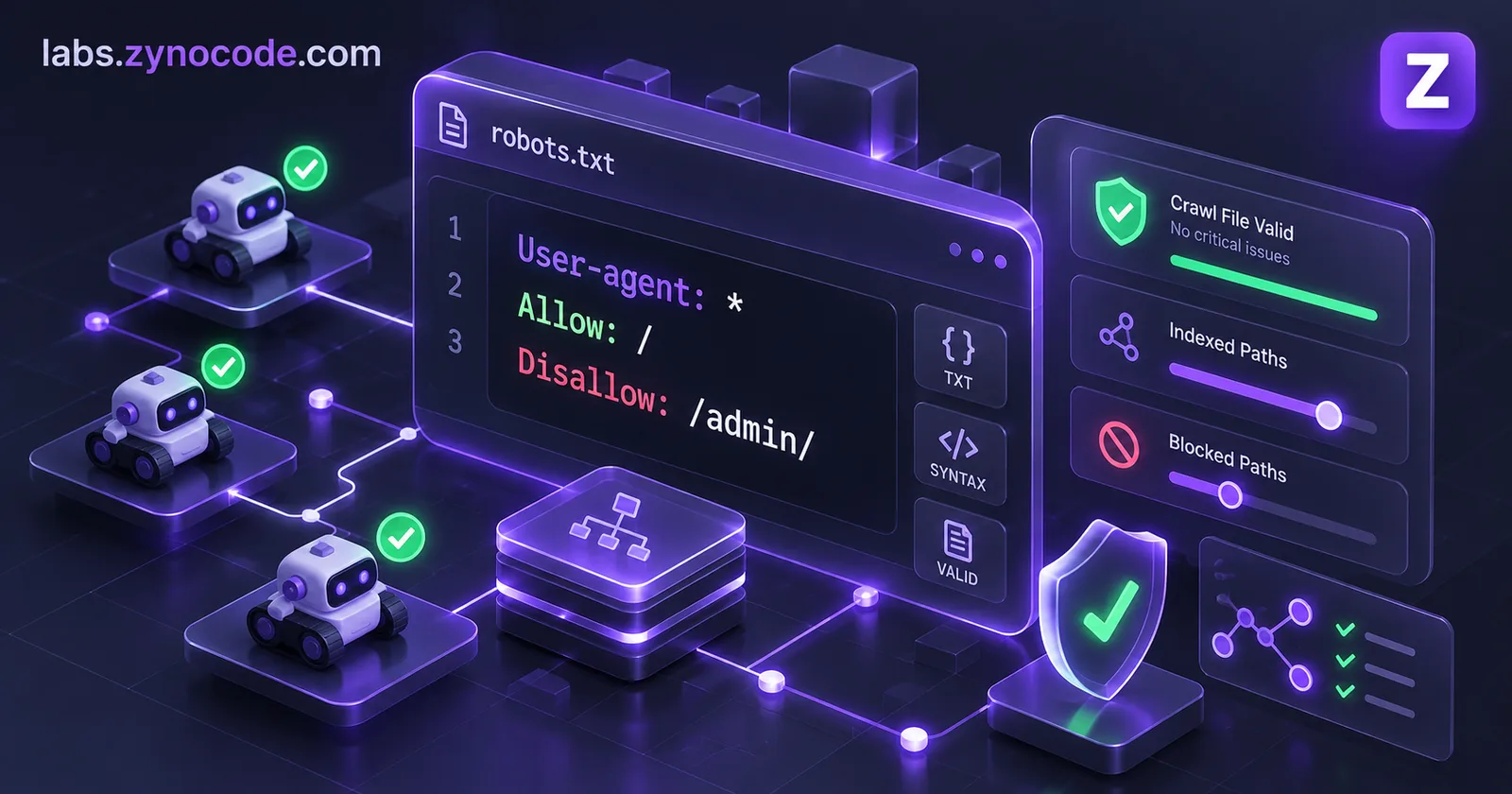
A robots.txt file is a plain text file placed at your website root that instructs automated crawlers which URL paths they can access. Following the RFC 9309 standard, search engines evaluate rules using the longest matching path pattern. It manages crawler traffic but does not prevent indexation if pages are linked externally.
Every website connected to the public internet encounters automated web robots. Search engines like Google and Bing crawl your pages to populate search results, commercial data collectors scrape pricing and directory listings, and AI companies ingest articles to train language models. The primary mechanism for managing these automated visitors is the Robots Exclusion Protocol, standardized by the Internet Engineering Task Force (IETF) in RFC 9309.
If you misconfigure your file, you risk removing your entire site from search engine results or wasting crawl budget on duplicate administrative pages. Studying real-world robots.txt examples and understanding the underlying RFC 9309 parsing rules ensures your directives work as intended.
In this comprehensive guide, we cover the core syntax of robots.txt, debunk common crawling myths, examine verified AI crawler tokens, provide 10 copy-paste templates, and show you how to generate compliant configurations using our free Robots.txt Generator.
Robots.txt Core Syntax and RFC 9309 Rules
A valid robots.txt file must be served from the root of your domain over HTTP or HTTPS at /robots.txt (for example, https://example.com/robots.txt). It is case-sensitive, encoded in UTF-8 text, and consists of directive groups separated by blank lines.
The table below outlines the core directives defined by RFC 9309 and major search engines:
| Directive | Purpose | Example | Search Engine Support |
|---|---|---|---|
User-agent | Identifies the crawler the following rules apply to. | User-agent: Googlebot | Supported by all crawlers conforming to RFC 9309. |
Disallow | Specifies a URL path prefix that the crawler must not access. | Disallow: /admin/ | Supported by all crawlers. Empty value (Disallow:) means allow everything. |
Allow | Explicitly permits access to a sub-path within a disallowed directory. | Allow: /admin/login | Supported by Google, Bing, and RFC 9309 compliant bots. |
Sitemap | Declares the absolute URL of an XML sitemap. | Sitemap: https://example.com/sitemap.xml | Supported globally across directive groups. |
Crawl-delay | Requests a pause (in seconds) between successive crawler requests. | Crawl-delay: 10 | Supported by Bing; support varies by crawler. Ignored by Googlebot. |
Wildcard Matching: Asterisk and End-of-Pattern Dollar Sign
RFC 9309 Section 2.2.3 formalizes two special pattern characters:
*(Asterisk): Designates zero or more instances of any valid character. For instance,Disallow: /*?*matches any URL containing a query string with a question mark.$(Dollar sign): Designates the exact end of the URL path pattern. For example,Disallow: /*.pdf$blocks any URL ending strictly with.pdf, while leaving/download-pdf-guideor/file.pdf?id=12accessible.
Rule Precedence: The Most Specific Match Wins
When a crawler encounters overlapping Allow and Disallow rules, it does not simply apply the rule written first. According to RFC 9309 Section 2.2.2:
- The crawler matches the pattern from the first character of the URI path.
- The crawler uses the most specific match, defined as the rule matching the greatest number of path characters (octets).
- If an
Allowrule and aDisallowrule match the exact same number of characters, theAllowrule takes precedence.
For example, consider these two rules:
Disallow: /blog/
Allow: /blog/case-studies/
For the URL /blog/case-studies/client-a, the Allow rule matches 19 characters, while the Disallow rule matches 6 characters. The crawler selects the longer match and allows access to the page.
robots.txt files, as documented in Google Search Central's crawling documentation. Any directives placed beyond the 500 KiB threshold are ignored by Googlebot.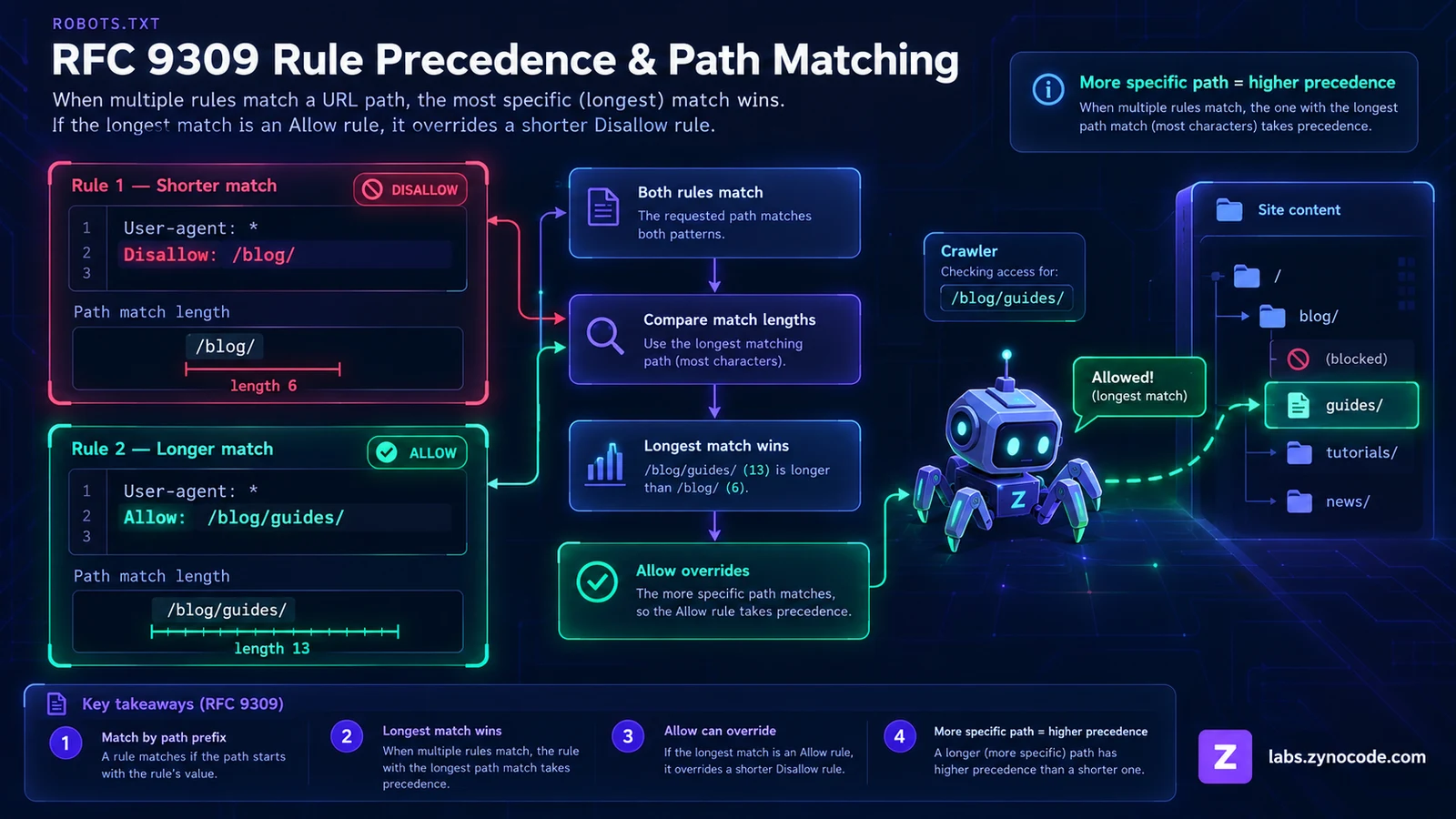
5 Critical Robots.txt Realities Every Webmaster Must Know
Misconceptions about robots.txt lead to severe SEO issues. Review these documented operational facts before deploying rules:
1. Robots.txt Does Not Prevent Indexing
Blocking a page in robots.txt only stops search engines from crawling the page content. It does not stop search engines from indexing the URL.
According to Google Search Central documentation on blocking indexing: if an external or internal link points to a disallowed URL with descriptive anchor text, Google can index that URL based on link signals alone. The result is an indexed search snippet showing only the URL title without a page description. To guarantee a page is removed from search results, you must leave the page crawlable and serve an on-page <meta name="robots" content="noindex"> tag or X-Robots-Tag: noindex HTTP response header.
2. Google Completely Ignores Crawl-Delay
Many older articles recommend adding Crawl-delay: 5 to reduce server load. Google Search Central documentation explicitly confirms that Google does not support crawl-delay. Adding this directive does not affect Googlebot crawl speed. To manage Googlebot crawl rate, use the crawl rate settings in your server infrastructure or return HTTP 429 (Too Many Requests) status codes.
3. Noindex Inside Robots.txt Is Unsupported
In July 2019, Google officially deprecated unsupported experimental rules, including specifying noindex inside robots.txt. If you write Noindex: /private/, Google treats it as an invalid line and ignores it.
4. Blocking Prevents Noindex Discovery
If you place <meta name="robots" content="noindex"> on a webpage and simultaneously add Disallow: /my-page/ in robots.txt, Googlebot cannot fetch the page HTML. Because the bot cannot read the HTML, it never sees your noindex tag. Keep URLs allowed in robots.txt while you wait for search engines to process removal tags.
5. Only One User-Agent Group Applies
When Googlebot reads a robots.txt file, it looks for the most specific user-agent group matching its name (Googlebot). If it finds a specific User-agent: Googlebot block, it completely ignores the generic User-agent: * block. Directives from User-agent: * are not merged into specific bot blocks.
AI Crawler Tokens: Managing Scrapers and LLM Bots
Generative AI platforms maintain specialized crawlers. You can control whether AI models ingest your site for training, real-time search grounding, or live user queries by addressing their verified user-agent tokens.
The table below lists verified bot tokens documented by OpenAI, Anthropic, and Google:
| Platform / Vendor | User-Agent Token | Crawler Function & Role | Official Vendor Source |
|---|---|---|---|
| OpenAI | GPTBot | Web crawler gathering publicly available content to train generative AI models. | OpenAI Bots Documentation |
| OpenAI | OAI-SearchBot | Crawls and indexes websites specifically for ChatGPT search features. Not used for model training. | OpenAI Bots Documentation |
| OpenAI | ChatGPT-User | User-agent triggered when ChatGPT users actively prompt the system to visit a specific URL. | OpenAI Bots Documentation |
| Anthropic | ClaudeBot | Ingests web content to train and improve Anthropic generative AI foundation models. | Anthropic Crawler Guidelines |
| Anthropic | Claude-SearchBot | Navigates and indexes web content to improve search result relevance and citation quality. | Anthropic Crawler Guidelines |
| Anthropic | Claude-User | Live fetch agent supporting on-demand browsing when users query Claude. | Anthropic Crawler Guidelines |
Google-Extended | Control token to manage whether content trains Gemini models and Vertex AI APIs. Does not affect Google Search. | Google Common Crawlers Documentation |
To complement your robots.txt controls with structured content summaries for AI assistants, create one with our llms.txt Generator.
10 Copy-Paste Robots.txt Examples
Use the tested configuration templates below to implement secure, optimized crawling rules for your platform.
Example 1: Standard Public Website (Allow All)
Ideal for standard content websites that want full discovery across search engines.
User-agent: *
Disallow:

Sitemap: https://example.com/sitemap.xml
Example 2: Staging and Development Environments (Block All)
Blocks all compliant crawlers from indexing private staging or testing domains.
User-agent: *
Disallow: /
Example 3: WordPress Production Setup
Blocks administrative dashboards and sensitive system files while preserving access to Ajax endpoints and public assets.
User-agent: *
Disallow: /wp-admin/
Allow: /wp-admin/admin-ajax.php
Disallow: /wp-includes/
Allow: /wp-includes/js/
Allow: /wp-includes/css/
Disallow: /readme.html
Disallow: /license.txt

Sitemap: https://example.com/sitemap_index.xml
Example 4: Shopify E-Commerce Store
Protects cart sessions, internal search queries, and customer account checkout pages from wasting crawl resources.
User-agent: *
Disallow: /admin
Disallow: /cart
Disallow: /orders
Disallow: /checkout
Disallow: /account
Disallow: /*?*sort_by=*

Sitemap: https://example.com/sitemap.xml
Example 5: Next.js and Headless Web Applications
Keeps crawlers out of API routes and the admin area. Do not block /_next/: Google needs those JavaScript, CSS and optimized image files to render your pages.
User-agent: *
Disallow: /api/
Disallow: /admin/

Sitemap: https://example.com/sitemap.xml
Example 6: Block Specific File Types with End-of-Pattern Dollar Sign
Prevents search engine crawlers from indexing private documents or downloadable archives.
User-agent: *
Disallow: /*.pdf$
Disallow: /*.doc$
Disallow: /*.docx$
Disallow: /*.zip$
Example 7: Block Internal Search and Filtering Query Parameters
Conserves crawl budget by blocking endless filter and sorting permutations while leaving clean canonical URLs open.
User-agent: *
Disallow: /*?*
Allow: /products$
Allow: /categories$

Sitemap: https://example.com/sitemap.xml
Example 8: Block AI Model Training While Allowing AI Search
Allows conversational engines to index your pages for cited search results while preventing your content from training foundation models.
User-agent: *
Disallow:

User-agent: GPTBot
Disallow: /

User-agent: OAI-SearchBot
Allow: /

User-agent: ClaudeBot
Disallow: /

User-agent: Claude-SearchBot
Allow: /

User-agent: Google-Extended
Disallow: /

Sitemap: https://example.com/sitemap.xml
Example 9: Block the Main AI Training Crawlers
Blocks the training crawlers from OpenAI, Anthropic and Google, plus Common Crawl's CCBot, whose public dataset is widely used to train AI models. AI search and user-triggered fetchers are not blocked by this example.
User-agent: *
Disallow:

User-agent: GPTBot
Disallow: /

User-agent: ClaudeBot
Disallow: /

User-agent: Google-Extended
Disallow: /

User-agent: CCBot
Disallow: /

Sitemap: https://example.com/sitemap.xml
Example 10: Multi-User-Agent Group Rules
Applies tailored rules for Googlebot while keeping standard guidelines for general crawlers.
User-agent: Googlebot
Disallow: /private/
Allow: /private/press-release/

User-agent: Bingbot
Disallow: /private/
Crawl-delay: 5

User-agent: *
Disallow: /private/

Sitemap: https://example.com/sitemap.xml
RFC 9309 Path Matching Logic: URL Test Table
To demonstrate how compliant crawlers evaluate pattern rules, we tested our example directives against real URL paths. The table below displays rule evaluation based on RFC 9309 path length precedence:
| Configured Rules in Group | Tested URL Path | Matched Rule | Result | RFC 9309 Precedence Reason |
|---|---|---|---|---|
Disallow: /wp-admin/ Allow: /wp-admin/admin-ajax.php | /wp-admin/edit.php | Disallow: /wp-admin/ | Blocked | Only the Disallow rule matches the path prefix. |
Disallow: /wp-admin/ Allow: /wp-admin/admin-ajax.php | /wp-admin/admin-ajax.php | Allow: /wp-admin/admin-ajax.php | Allowed | Allow rule length (24 chars) exceeds Disallow rule (10 chars). |
Disallow: /api/ Disallow: /_next/ Allow: /_next/static/ | /_next/static/css/app.css | Allow: /_next/static/ | Allowed | Allow rule length (14 chars) exceeds Disallow rule (7 chars). |
Disallow: /api/ Disallow: /_next/ Allow: /_next/static/ | /_next/data/build/page.json | Disallow: /_next/ | Blocked | Only Disallow: /_next/ matches the build manifest path. |
Disallow: /*.pdf$ Allow: /public/catalog.pdf | /docs/financial-report.pdf | Disallow: /*.pdf$ | Blocked | Wildcard pattern ends with .pdf matching end of URI string. |
Disallow: /*.pdf$ Allow: /public/catalog.pdf | /public/catalog.pdf | Allow: /public/catalog.pdf | Allowed | Specific Allow rule (19 chars) takes precedence over wildcard pattern. |
Disallow: /*.pdf$ | /docs/report.pdf?download=1 | None | Allowed | URI does not end with .pdf due to query parameter string. |
Disallow: /*?*sort= | /shop/shoes?category=boots&sort=low | Disallow: /*?*sort= | Blocked | URL contains query string with sort parameter matching wildcard. |
How to Test and Deploy Your Robots.txt
A wrong robots.txt rule can stop search engines from crawling important pages. Follow this verification sequence before publishing changes:
- Build Your Configuration: Use our free Robots.txt Generator: start from a preset (Allow all, Block all for staging, WordPress or Next.js), type any user-agent or pick one from the suggestions, add paths and sitemaps, and choose whether to block AI training crawlers or all listed AI crawlers. Before downloading, enter a crawler and a URL in the built-in tester to see whether it is allowed or blocked and which rule decided it.
- Download and Place at Root: Save the output as
robots.txtand upload it directly to your server root directory so it resolves athttps://example.com/robots.txt. - Verify HTTP Headers: Ensure your server returns an
HTTP 200 OKstatus and serves the file withContent-Type: text/plain; charset=utf-8. - Check in Google Search Console: Open the robots.txt report to confirm Google fetched your new file without errors. To check a specific page, run it through the URL Inspection tool, which shows whether robots.txt blocks crawling.
- Inspect Server Redirects: If using Apache or Nginx redirects, ensure
/robots.txtdoes not redirect across multiple hops or redirect to a localized subdomain. For managing redirect rules, use our .htaccess Generator. - Add Schema Markup: Ensuring crawlability works hand-in-hand with search enhancement. Generate structured rich snippets for your allowed pages using our Schema Markup Generator.
Conclusion and Next Steps
A clean robots.txt file is fundamental to search engine optimization and crawl management. By observing RFC 9309 rule precedence, leaving private pages open for noindex discovery, and targeting AI crawlers with dedicated tokens, you keep your site secure and discoverable.
To configure and validate your crawler directives:
- Create your rules with the browser-based Robots.txt Generator.
- If your server runs Apache, generate matching rewrite rules with the .htaccess Generator.
- Define assistant-specific guidelines using the llms.txt Generator.
- Win rich snippet search listings on your allowed pages using the Schema Markup Generator.
Frequently asked questions
Does robots.txt prevent a URL from appearing in Google search results?+
No. A robots.txt file blocks crawling, not indexing. If external or internal links point to a disallowed URL, Google can index the URL and display it in search snippets without crawling page content. To prevent indexing, allow crawling and apply a noindex robots meta tag or HTTP response header.
Does Google support the crawl-delay directive in robots.txt?+
No. Google Search Central documentation explicitly confirms that Google does not support crawl-delay. Bing supports crawl-delay, but Googlebot ignores it entirely. To slow Googlebot down temporarily, Google recommends returning 500, 503 or 429 status codes.
Can I add a noindex directive inside robots.txt?+
No. Google officially discontinued support for noindex directives inside robots.txt. If you write noindex in robots.txt, Google ignores the directive. Furthermore, blocking a page in robots.txt prevents Googlebot from reading any on-page meta noindex tag.
How does robots.txt handle conflicting Allow and Disallow rules?+
Under RFC 9309 Section 2.2.2, crawlers evaluate path length and apply the most specific rule (the pattern matching the most octets). If an Allow rule and a Disallow rule match the exact same number of characters, crawlers give precedence to the Allow directive.
How do I block AI companies from using my content for model training?+
You can specify disallow directives for dedicated AI training tokens such as GPTBot (OpenAI), ClaudeBot (Anthropic), and Google-Extended (Google) in your robots.txt. This stops automated training ingestion while allowing standard search crawlers like Googlebot to index your site.

Prashant Sharma · Founder & Technology Strategist
Prashant Sharma is the founder of Zynocode IT Solutions, specializing in web development, SEO tooling and generative AI workflows.