All tools are provided for informational and educational purposes. Processed data is stored fully inside your browser memory and never uploaded to our servers.
Resize Image for Facebook Cover & Post
Last updated
The official Facebook page cover photo size is 851 × 315 pixels (aspect ratio ~2.7:1), displaying at 820 × 312 pixels on desktop computers and 640 × 360 pixels on mobile smartphones. Because mobile crops the sides while desktop crops top and bottom, design within a centralized safe zone of 640 × 312 pixels. Feed posts are best sized at 1200 × 630 pixels (1.91:1). Our tool formats cover photos directly in your browser with zero data retention.
Resize graphics for Facebook business page covers (851×315 px) and timeline feed posts (1200×630 px). Pre-align with mobile safe zones directly in your browser without losing resolution or uploading to third-party servers.
Runs in your browser
Your files and text are processed locally in your browser and are not uploaded.
How to Resize Images for Facebook Cover and Feed Posts
- Upload your banner or branding graphic.
- Choose 'Facebook Cover' (851×315 px) or 'Facebook Post' (1200×630 px) from the preset bar.
- Select 'Cover' crop mode to fill the banner canvas or 'Fit' to add clean white margins.
- Click 'Resize Image' to render your file client-side.
- Download your optimized image and set it as your Facebook page cover or post.
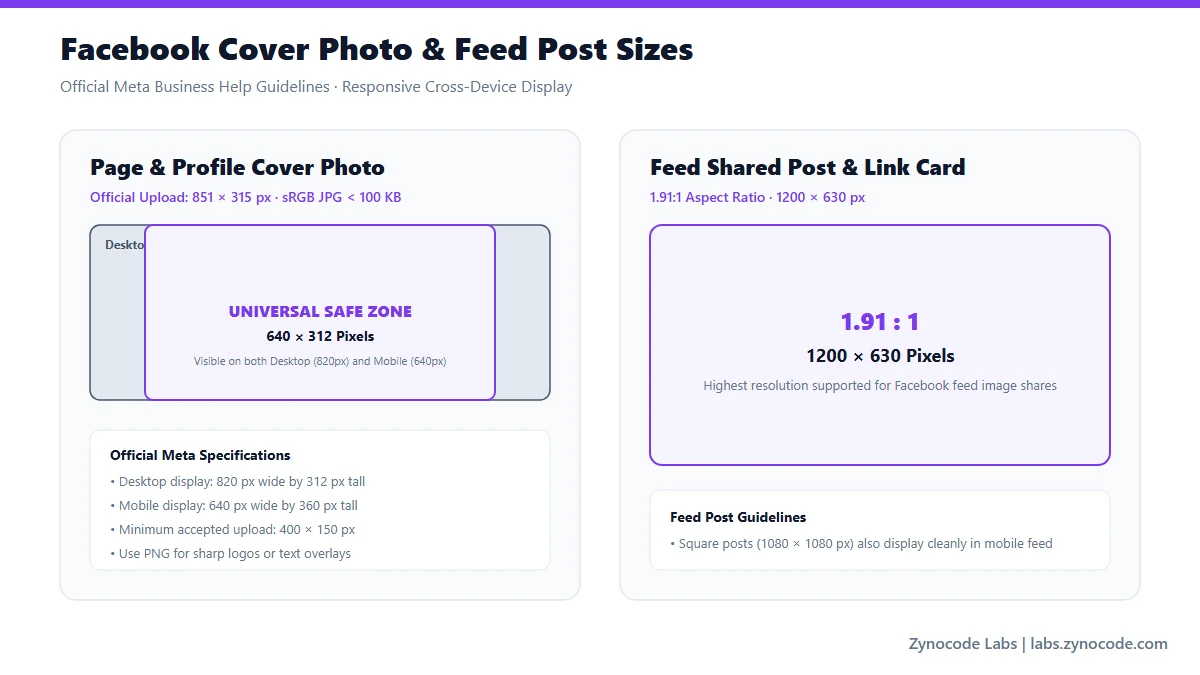
Official Facebook page cover and post specifications (Meta Business Help)
Official Facebook Image Dimensions & Mobile Safe Zones
| Placement Type | Target Dimensions | Aspect Ratio | Safe Zone / Display Notes | Source Status |
|---|---|---|---|---|
| Page / Profile Cover Photo | 851 × 315 px | ~2.7:1 | Safe zone: 640 × 312 px centered (mobile crop) | Official Meta Help |
| Feed Shared Post | 1200 × 630 px | 1.91:1 | Desktop and mobile feed standard | Official Meta Business Help |
| Group Cover Photo | 1640 × 856 px | 1.91:1 | Safe area: keep text within 1640 × 664 px | Official Meta Help |
| Event Cover Photo | 1920 × 1005 px | 16:9 | Standard widescreen event banners | Official Meta Help |
| Profile Picture | 176 × 176 px (display) | 1:1 circular | Upload at 720 × 720 px for retina displays | Official Meta Help |
Source: Meta Business & Facebook Help Center — Page Cover Photo Specs (https://www.facebook.com/help/125379114252045 and https://www.facebook.com/business/help/105399436216001)
Solving the Facebook Cover Mobile vs Desktop Crop Problem
Facebook applies different aspect ratios depending on device type: on desktop monitors it displays your cover at 820 × 312 px, but on smartphones it displays at 640 × 360 px (taller aspect ratio). An image formatted to 851 × 315 px will have roughly 105 px cropped from the left and right sides on mobile. Placing text, logos, and phone numbers in the central 640 × 312 px area prevents content cutoff across all screens.
Preventing Compression Artifacts on Facebook
Facebook heavily recompresses uploaded cover images to save bandwidth. To avoid muddy JPEG artifacts, upload in sRGB color space and keep file sizes under 100 KB whenever possible. You can use our companion /tools/image-compressor to compress your banner to an exact KB limit before uploading.
Frequently asked questions
What is the official Facebook cover photo size in 2026?
Facebook's official specification is 851 pixels wide by 315 pixels tall. It must be at least 400 pixels wide and 150 pixels tall to be accepted by Meta.
Why does my Facebook cover photo get cut off on mobile phones?
Desktop displays the cover at an ultra-wide ~2.7:1 ratio, while the mobile app crops the sides to render a taller view. Centering your important design elements inside the 640 × 312 px safe area prevents mobile clipping.
What is the ideal size for a Facebook timeline post image?
For single-image feed posts and shared link previews, 1200 × 630 pixels (1.91:1 aspect ratio) provides maximum visual fidelity across both mobile apps and desktop web.
How do I prevent Facebook from compressing my photos to low quality?
Pre-resize your image to exact pixel dimensions (851×315 for covers, 1200×630 for posts) and save as high-quality JPEG or PNG. Bypassing Meta's server-side downscaler prevents image degradation.
Social Media Image Sizes
Standard File Sizes
Need to compress an image before posting? Use our free Image Compressor to compress photos to exact file sizes without quality loss.
Need a different size? Use the full Image Resizer.