All tools are provided for informational and educational purposes. Processed data is stored fully inside your browser memory and never uploaded to our servers.
Resize Image for WhatsApp DP
Last updated
The official Meta WhatsApp Business Cloud API standard for profile photos is 640 × 640 pixels (1:1 square), while the consumer WhatsApp mobile app recommends at least 500 × 500 pixels (minimum 192 × 192 px). Because WhatsApp automatically clips profile photos into a circular mask, design with all faces, logos, and critical details inside the central inscribed circle (radius 320 px). Processing in this browser tool ensures your photo fits without awkward cropping or server uploads.
Resize any photo or logo for your WhatsApp DP (profile picture) to 640×640 px (Meta Business API) or 500×500 px (consumer standard). Ensure full circular mask fit with zero distortion, zero server uploads, and 100% privacy.
Runs in your browser
Your files and text are processed locally in your browser and are not uploaded.
How to Resize an Image for WhatsApp DP (Profile Picture)
- Upload your headshot, family photo, or brand logo.
- The WhatsApp DP preset automatically locks the canvas to 640 × 640 px (1:1 square).
- Select 'Cover' to fill the square or 'Fit' to letterbox with a white background so no edges are cut.
- Click 'Resize Image' to process the square format directly in your browser.
- Download your picture and set it as your WhatsApp profile photo without manual cropping.
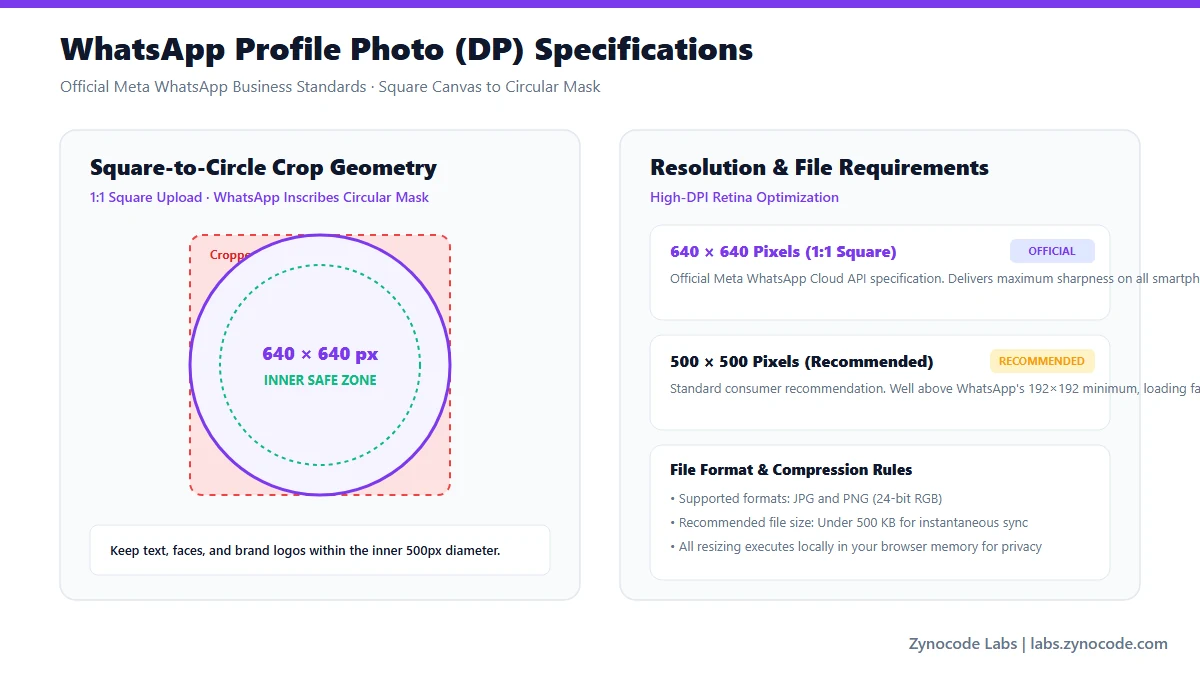
Meta WhatsApp Business API specifications and consumer display guidance
WhatsApp Profile Photo & Status Dimensions
| Asset / Placement | Dimensions (px) | Aspect Ratio | Display Format | Source Status |
|---|---|---|---|---|
| Profile Photo (DP) — Business API | 640 × 640 px | 1:1 square | Masked to circle (640 px diameter) | Official Meta Business API Standard |
| Profile Photo (DP) — Consumer | 500 × 500 px | 1:1 square | Masked to circle (minimum 192 × 192 px) | Recommended Consumer Standard |
| WhatsApp Status (Story) | 1080 × 1920 px | 9:16 vertical | Full-screen vertical image/video | Recommended Creator Guidance |
| Chat Shared Image (Standard) | 1280 × 720 px or 1600 × 1200 px | Variable | Compressed automatically by WhatsApp servers | Standard WhatsApp Client |
Source: Meta WhatsApp Business Cloud API — Business Profile Specs (https://developers.facebook.com/docs/whatsapp/cloud-api/reference/business-profiles) & WhatsApp Help Center (https://faq.whatsapp.com/)
Formatting for the WhatsApp Circular Avatar Mask
WhatsApp displays profile photos inside a circular mask across chat lists, group member lists, and call screens. When you upload a rectangular or tight square photo, corners are trimmed away. Choosing 'Fit' mode in our resizer adds clean white borders around the image so the full rectangular photo fits within the circular boundary without losing outer edges.
WhatsApp Compression vs In-Browser Pre-Resizing
When you upload high-megapixel photos (like 48 MP smartphone camera shots) to WhatsApp, the app downsamples them aggressively, often reducing clarity. Pre-scaling your photo to 640 × 640 px using our client-side Canvas engine keeps details crisp and prevents compression fuzziness.
Need to compress large photo files to exact KB limits? Check out our free /tools/image-compressor.
Frequently asked questions
What is the official size for a WhatsApp DP (profile photo)?
Meta's WhatsApp Business Cloud API specifies 640 × 640 pixels (1:1 square). For personal consumer WhatsApp accounts, 500 × 500 pixels is recommended, with a minimum required dimension of 192 × 192 pixels.
Why does WhatsApp crop square corners off my profile photo?
WhatsApp automatically applies a circular mask to all profile photos. To prevent important content from being cut off at the corners, keep key facial features or logo marks centered within the middle 80% of the canvas.
How do I make a full-size photo fit WhatsApp DP without cropping?
Select the WhatsApp DP preset and toggle the crop mode to 'Fit'. This scales your entire rectangular photo inside a 640 × 640 square canvas with a clean white background, allowing the whole photo to fit inside WhatsApp without cropping.
Does this tool upload my personal photos to any server?
No. The resizing, cropping, and JPEG conversion happen entirely on your device inside the web browser using HTML5 Canvas. Your personal photos are never transmitted over the internet.
Social Media Image Sizes
Standard File Sizes
Need to compress an image before posting? Use our free Image Compressor to compress photos to exact file sizes without quality loss.
Need a different size? Use the full Image Resizer.