All tools are provided for informational and educational purposes. Processed data is stored fully inside your browser memory and never uploaded to our servers.
Resize Image for Twitter (X)
Last updated
The official recommended size for an X (formerly Twitter) header banner is 1500 × 500 pixels (3:1 aspect ratio, max 5 MB). The recommended size for in-stream post images is 1600 × 900 pixels (16:9 widescreen) or 1200 × 675 pixels. Profile avatars should be 400 × 400 pixels (1:1 square masked into a circle). Formatting your assets to these sizes ensures crisp display on desktop feeds and mobile timelines without unwanted cropping.
Resize graphics for X (Twitter) profile headers (1500×500 px) and in-stream timeline posts (1600×900 px, 16:9). Instant client-side cropping and formatting with zero server uploads and zero privacy risk.
Runs in your browser
Your files and text are processed locally in your browser and are not uploaded.
How to Resize Images for X (Twitter) Headers and In-Stream Posts
- Upload your banner artwork, meme, chart, or screenshot.
- Select 'X Post' (1600×900 px) or 'X Header' (1500×500 px) from the presets.
- Check the preview and choose 'Cover' to fill the frame cleanly without distortion.
- Click 'Resize Image' to execute in-browser processing.
- Download your X-ready file and post or upload it to your profile customization settings.
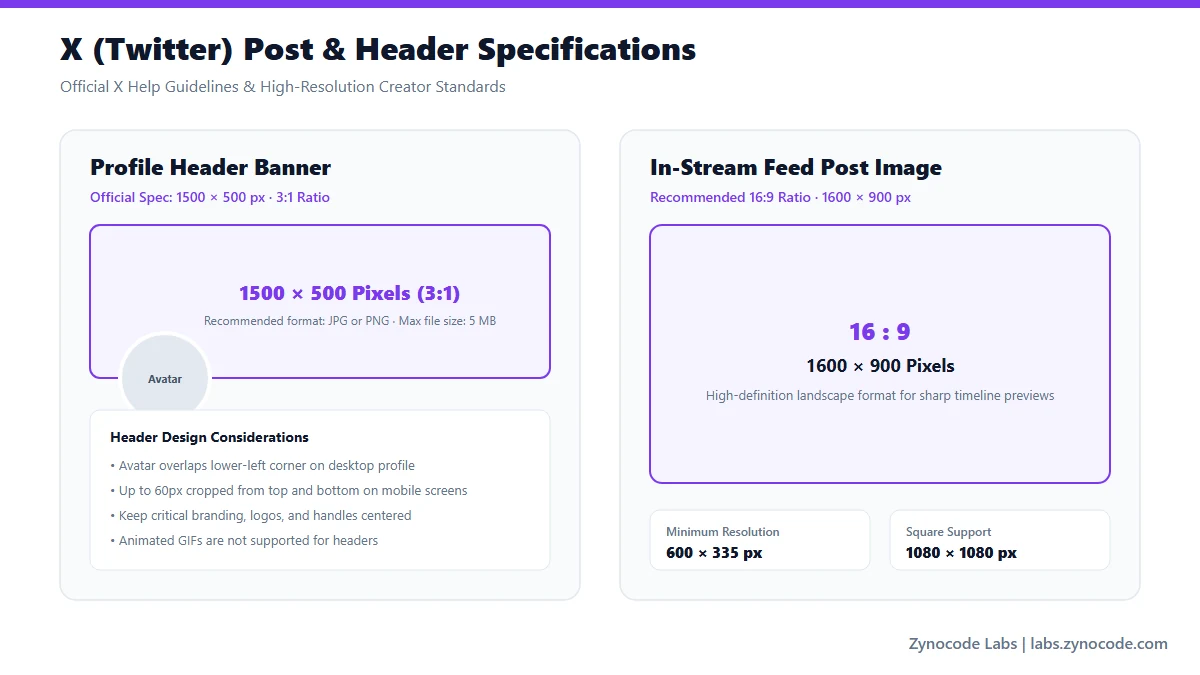
Official X Help Center profile and media recommendations
X (Twitter) Official & Recommended Graphic Dimensions
| Asset Type | Dimensions | Aspect Ratio | File Limits & Formats | Source Status |
|---|---|---|---|---|
| In-Stream Tweet Post | 1600 × 900 px | 16:9 | JPG, PNG, WebP up to 5 MB on mobile (15 MB web) | Recommended Industry Standard |
| Profile Header / Banner | 1500 × 500 px | 3:1 | JPG, PNG, max 5 MB (top/bottom 60 px safe area) | Official X Help Center |
| Profile Photo (Avatar) | 400 × 400 px | 1:1 circular | JPG, PNG, max 2 MB | Official X Help Center |
| Twitter Card / Link Preview | 1200 × 628 px | 1.91:1 | Summary large image card standard | Official X Developer Platform |
Source: X (formerly Twitter) Help Center — How to customize your profile (https://help.twitter.com/en/managing-your-account/how-to-customize-your-profile)
Maximizing Engagement with 16:9 In-Stream Posts on X
X displays single images in the timeline at a 16:9 aspect ratio. When images have extreme vertical or panoramic ratios, X applies a centered crop box in the feed preview until users tap to expand. Designing at 1600 × 900 px guarantees that the entire image displays in full view on both the web client and mobile apps without thumbnail truncation.
Profile Header Safe Zones and Avatar Clearance
X header banners (1500 × 500 px) are subject to edge cropping on narrow mobile screens, and the circular profile avatar overlaps the bottom-left corner of the header. Keep critical titles, social handles, and company URLs centered and at least 60 pixels away from the top, bottom, and left edges.
If you need to compress image files before posting on mobile data, use our browser-based /tools/image-compressor.
Frequently asked questions
What are the official dimensions for an X (Twitter) header banner?
X officially specifies 1500 pixels wide by 500 pixels tall (3:1 aspect ratio) with a file size limit of 5 MB in JPG or PNG format.
What is the recommended size for an in-stream X post image?
The standard recommended size is 1600 × 900 pixels (16:9 widescreen). Images at 1200 × 675 pixels also maintain the exact 16:9 ratio and fit within mobile data allowances.
Why does X crop parts of my vertical post preview?
X automatically crops timeline image previews to fit standard aspect ratios. Resizing your images to 16:9 (1600 × 900) or square (1080 × 1080) ensures nothing gets cropped in the feed.
How can I resize images for X without losing quality?
This tool uses HTML5 Canvas to resample pixels client-side and preserves full color fidelity at high JPEG quality (90%+), eliminating third-party compression artifacts.
Social Media Image Sizes
Standard File Sizes
Need to compress an image before posting? Use our free Image Compressor to compress photos to exact file sizes without quality loss.
Need a different size? Use the full Image Resizer.