All tools are provided for informational and educational purposes. Processed data is stored fully inside your browser memory and never uploaded to our servers.
Resize Image for LinkedIn
Last updated
The official LinkedIn recommended size for a feed post image is 1200 × 627 pixels (1.91:1 aspect ratio), with square posts supported at 1200 × 1200 pixels (1:1). Personal profile background banners should be exactly 1584 × 396 pixels (4:1 aspect ratio, max 8 MB), while company page cover images are 1128 × 191 pixels. Using verified dimensions keeps headlines and charts legible across both desktop workstations and the LinkedIn mobile app.
Resize graphics, infographics, and headshots for LinkedIn feed posts (1200×627 px) or profile cover banners (1584×396 px). 100% private in-browser resizing with official platform aspect ratio presets.
Runs in your browser
Your files and text are processed locally in your browser and are not uploaded.
How to Resize Images for LinkedIn Feed Posts and Profile Banners
- Upload your banner graphic, slide visual, or professional photograph.
- Select 'LinkedIn Post' (1200×627 px) or 'LinkedIn Banner' (1584×396 px) from the presets.
- Adjust the crop mode: 'Cover' scales to fill the rectangular frame, while 'Fit' preserves the full visual.
- Click 'Resize Image' to process the photo in your browser.
- Download the optimized file and upload it directly to your LinkedIn feed or profile editor.
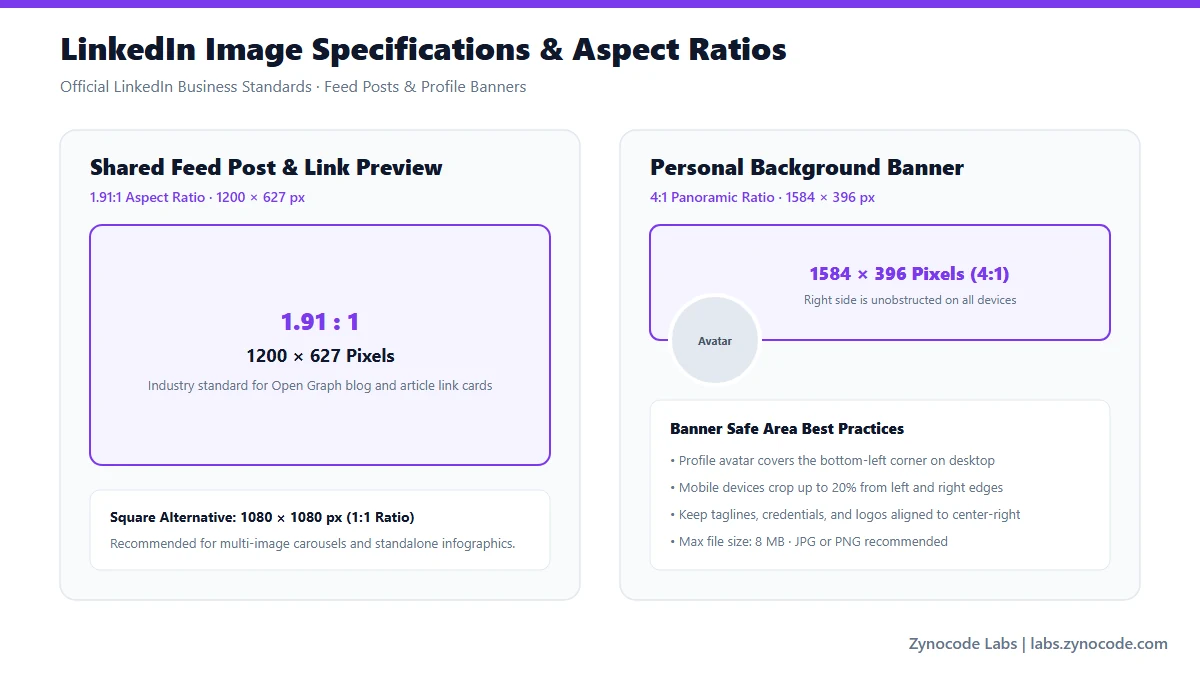
Official LinkedIn feed and banner specifications (LinkedIn Help Center)
Official LinkedIn Image Dimensions & Safe Zones
| Format / Placement | Target Dimensions | Aspect Ratio | File Limit & Specs | Source Status |
|---|---|---|---|---|
| Feed Single Image / Link Post | 1200 × 627 px | 1.91:1 | PNG / JPEG / WebP, max 8 MB | Official LinkedIn Marketing |
| Personal Profile Banner | 1584 × 396 px | 4:1 | PNG / JPEG, max 8 MB | Official LinkedIn Help |
| Company Page Cover Banner | 1128 × 191 px | 5.9:1 | PNG / JPEG, max 5 MB | Official LinkedIn Help |
| Profile Photo (Headshot) | 400 × 400 px | 1:1 circular | PNG / JPEG, max 8 MB | Official LinkedIn Help |
Source: LinkedIn Help Center & Marketing Solutions Help (https://www.linkedin.com/help/lms/answer/a423376 and https://www.linkedin.com/help/linkedin/answer/a540581)
LinkedIn Feed Image Optimization for Professionals
LinkedIn's desktop feed highlights landscape visual assets formatted at 1200 × 627 px (1.91:1 ratio). When linking to articles or case studies, this exact proportion generates crisp social graph preview cards. If your graphics contain infographics, ensure font sizes remain at least 16px relative to the 1200px width so mobile users can read without zooming.
Profile Banner Safe Zone and Headshot Overlap
On personal LinkedIn profile banners (1584 × 396 px), your circular profile photo overlaps the bottom-left area of the cover banner on desktop and mobile. To prevent your face from obscuring contact info or taglines, keep all text and contact details aligned to the right-hand two-thirds of the banner canvas.
Need to reduce your banner size before uploading? Use our browser-based /tools/image-compressor to keep files under 8 MB.
Frequently asked questions
What is the official size for a LinkedIn post image?
LinkedIn officially recommends 1200 × 627 pixels (1.91:1 ratio) for feed link posts and single images. Square images at 1200 × 1200 pixels are also supported and render well on mobile devices.
What dimensions should I use for my LinkedIn profile banner?
For personal profiles, use 1584 × 396 pixels (4:1 aspect ratio) with a file size under 8 MB. For company pages, LinkedIn recommends 1128 × 191 pixels.
Why do vertical photos get cropped on desktop LinkedIn?
Desktop LinkedIn caps post height in the feed. Taller images (like 4:5 or 9:16) get cropped with gray letterboxing. Using 1200 × 627 px or 1200 × 1200 px avoids unwanted desktop cropping.
Can I compress my LinkedIn banner to under 8 MB?
Yes. This tool automatically outputs compact, crisp JPEGs well within LinkedIn's 8 MB ceiling. For advanced size tuning, our /tools/image-compressor tool lets you lock in any exact target KB.
Social Media Image Sizes
Standard File Sizes
Need to compress an image before posting? Use our free Image Compressor to compress photos to exact file sizes without quality loss.
Need a different size? Use the full Image Resizer.