All tools are provided for informational and educational purposes. Processed data is stored fully inside your browser memory and never uploaded to our servers.
Resize Image for YouTube Thumbnail
Last updated
The official YouTube custom thumbnail resolution is 1280 × 720 pixels, with a minimum width of 640 pixels and a 16:9 widescreen aspect ratio. YouTube strictly enforces a maximum file size of 2 MB for video thumbnails (10 MB for podcasts). Supported formats include JPEG, PNG, and GIF. Resizing your artwork to 1280 × 720 px guarantees maximum clarity across desktop, mobile, and smart TVs.
Resize graphics, stills, or photos to the official YouTube thumbnail specification of 1280 × 720 pixels (16:9 widescreen) under 2 MB. Instant client-side processing with zero compression artifacts and zero cloud uploads.
Runs in your browser
Your files and text are processed locally in your browser and are not uploaded.
How to Resize an Image for a YouTube Thumbnail (1280×720)
- Upload your thumbnail artwork or video screenshot.
- The YouTube Thumbnail preset automatically locks the target to 1280 × 720 px (16:9) and sets a 2 MB ceiling.
- Check the preview and choose 'Cover' to fill the frame or 'Fit' to letterbox.
- Click 'Resize Image' to render your thumbnail instantly.
- Download your optimized file and upload it in YouTube Studio under Video Details > Thumbnail.
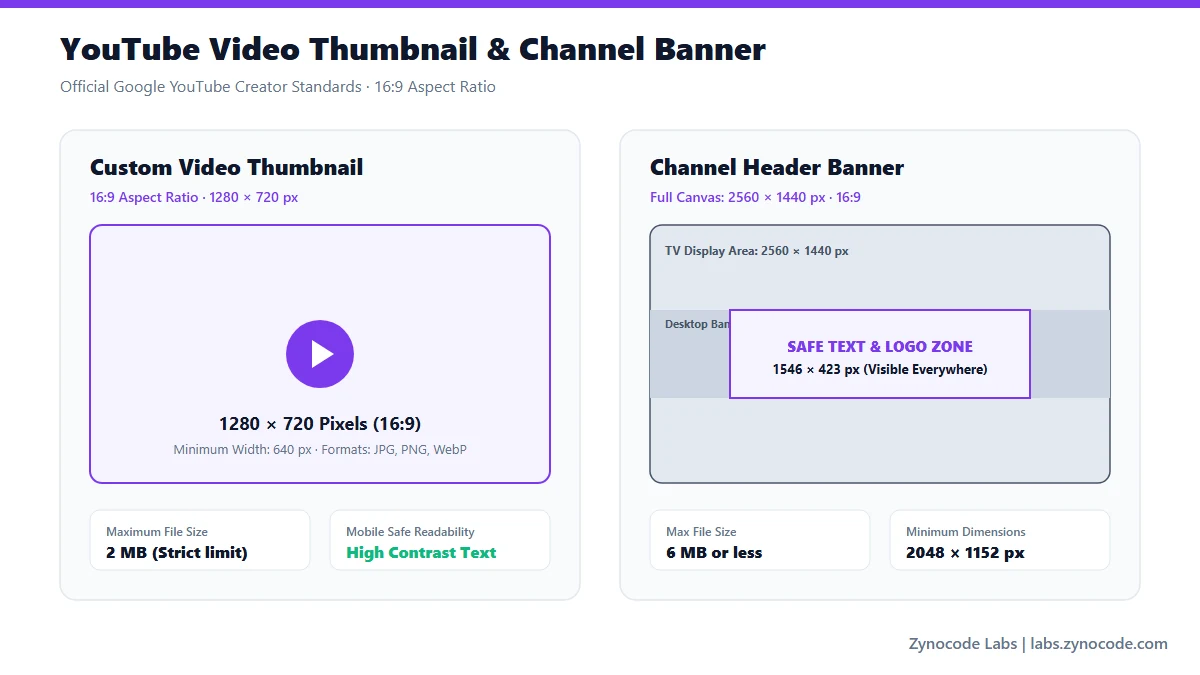
Official YouTube image resolutions and safe areas (Google YouTube Help)
Official YouTube Image Specifications & Guidelines
| Asset Type | Recommended Dimensions | Aspect Ratio | File Size Ceiling | Source Status |
|---|---|---|---|---|
| Video Custom Thumbnail | 1280 × 720 px (min 640w) | 16:9 | Under 2 MB (JPG, GIF, PNG) | Official YouTube Help |
| Channel Banner (Desktop/TV) | 2560 × 1440 px | 16:9 | Under 6 MB (safe zone 1546×423 px) | Official YouTube Help |
| Channel Profile Picture | 800 × 800 px | 1:1 circular | Under 4 MB | Official YouTube Help |
| Community Post Image | 1080 × 1080 px or 1200 × 675 px | 1:1 or 16:9 | Under 16 MB | Official YouTube Help |
Source: Google YouTube Help Center — Add video thumbnails & banner specifications (https://support.google.com/youtube/answer/72431 and https://support.google.com/youtube/answer/2972003)
Why 1280×720 is the Gold Standard for YouTube CTR
While YouTube displays thumbnails as small as 168 × 94 px in the sidebar feed, it scales them up on 4K TV apps, tablets, and desktop cinema modes. If you upload a thumbnail smaller than 1280 × 720, it will appear pixelated on larger displays. Starting with 1280 × 720 ensures high pixel density across every device screen.
Beating YouTube's Strict 2 MB Upload Limit
YouTube Studio rejects any thumbnail file that exceeds 2 MB (2,048 KB). If your high-resolution render exceeds this limit, this tool automatically compresses the JPEG payload to remain under 2,000 KB. For standalone image compression to custom KB thresholds, pair this workflow with our /tools/image-compressor.
Frequently asked questions
What is the exact official size for a YouTube custom thumbnail?
Google specifies 1280 × 720 pixels with a 16:9 aspect ratio and a minimum width of 640 pixels. The maximum file size allowed by YouTube Studio is 2 MB in JPG, PNG, or GIF format.
Why does YouTube reject my thumbnail upload?
The most common reason is file size exceeding the 2 MB limit, followed by incorrect aspect ratios or unsupported file extensions. This tool guarantees both the exact 1280 × 720 px dimensions and compresses the file under 2 MB.
What is the channel banner safe area for mobile and desktop?
While YouTube banners require a 2560 × 1440 px canvas for 4K TVs, the central safe area for desktop and mobile displays is 1546 × 423 px. All important text and channel branding must remain inside that central band.
Does resizing client-side degrade thumbnail sharpness?
No. The client-side Canvas resizer uses high-quality bicubic interpolation and high JPEG quality (90-95%) to preserve crisp edges and sharp text overlays.
Social Media Image Sizes
Standard File Sizes
Need to compress an image before posting? Use our free Image Compressor to compress photos to exact file sizes without quality loss.
Need a different size? Use the full Image Resizer.